
Building Multi-MCP Server Workflows With Claude
I now use Claude to have my email and calendaring talk to one another

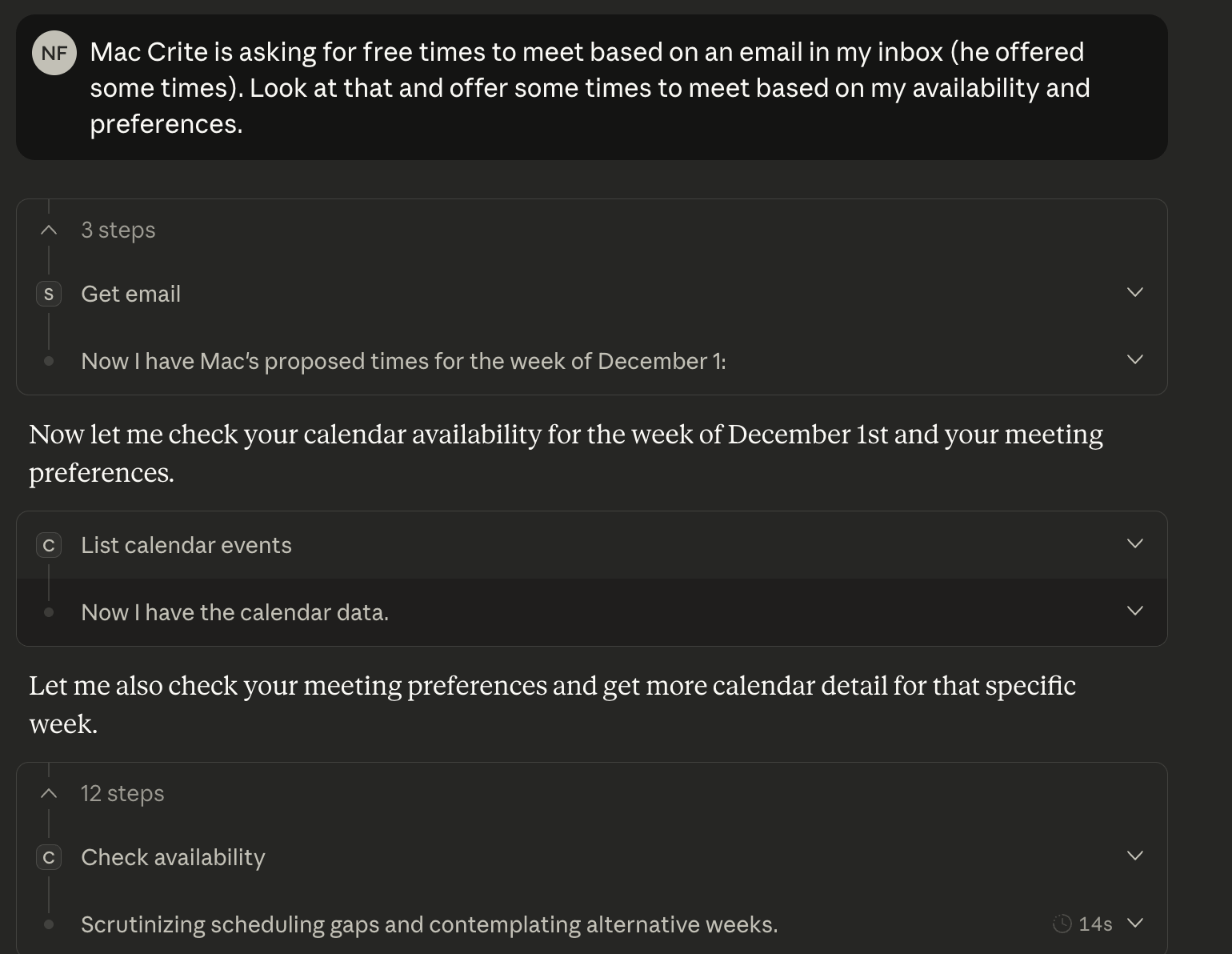
I recently built an MCP server for Google Calendar. It’s called calendar-mcp and it’s on GitHub. I also have one for email and meeting transcripts called spark-mcp (also on GitHub). Together they let Claude access my schedule and communications in a single conversation.
What These Servers Do
calendar-mcp gives Claude access to Google Calendar:
List events across all calendars (primary, work, shared)
Find when I last met with someone
Create events and send invitations
Accept/decline calendar invites
Find optimal meeting times based on configured preferences
Analyze time blocks (deep work vs. flexible time)
spark-mcp gives Claude access to email and meeting transcripts:
Search and read emails
Find emails needing responses
Extract action items from messages
Access meeting transcripts
Search transcript content
Using Them Together
The useful part is running both servers at once. Claude can pull from either system as needed, which means queries can span both without any extra work on my end.
Some examples of what this looks like:
“What do I need to be prepared for tomorrow?”
Claude checks the calendar for tomorrow’s meetings, then searches emails for recent threads with those attendees. I get a briefing that includes both the meeting details and relevant email context.
“What were the action items from my meeting with Andrew last Tuesday?”
Claude finds the meeting on the calendar, pulls the transcript from spark-mcp, and extracts the action items. One query, two systems.
“Do I have any emails I need to respond to before my 2pm?”
Claude checks pending responses in email, cross-references with the calendar to see what’s at 2pm, and prioritizes accordingly.
“Find a time to meet with Sarah next week and draft an email inviting her.”
Claude uses calendar-mcp to find available slots (respecting my preferences), then uses the email context to draft an appropriate message.
Why LLMs Beat Existing Solutions:
Understanding Soft Preferences
calendar-mcp has a configuration file for scheduling preferences:
{
  “preferredDays”: {
    “Wednesday-PM”: 100,
    “Thursday”: 100,
    “Monday-PM”: 70,
    “Tuesday”: 40,
    “Friday”: 40
  },
  “preferAdjacentToMeetings”: true,
  “avoidDeepWorkBlocks”: true,
  “neverAvailablePatterns”: [”kids”]
}
When finding meeting times, Claude ranks options by these preferences. Wednesday afternoons and Thursdays score highest. It looks for slots adjacent to existing meetings to consolidate context-switching. It avoids blocks marked as deep work. Events with “kids” in the title are treated as immovable.
Setup
Both servers require OAuth setup with Google APIs—Calendar API for calendar-mcp, Gmail API for spark-mcp. The README files walk through the process. Once authenticated, you add them to your Claude Desktop config:
{
  “mcpServers”: {
    “calendar”: {
      “command”: “python”,
      “args”: [”-m”, “calendar_mcp.server”],
      “cwd”: “/path/to/calendar-mcp”
    },
    “spark”: {
      “command”: “python”,
      “args”: [”-m”, “spark_mcp.server”],
      “cwd”: “/path/to/spark-mcp”
    }
  }
}
Restart Claude Desktop and both servers are available.
Why This Works
MCP servers are additive. Each one gives Claude access to a different system, and Claude figures out which tools to use based on the query. I don’t have to think about which server handles what—I just ask questions and Claude routes appropriately.
The combination of calendar and email covers most of my organizational needs. I can check my schedule, find context from past communications, schedule new meetings, and respond to emails all in the same conversation where I’m doing actual work.
Both projects are open source: calendar-mcp and spark-mcp.